

Field Trip Management - Tripfinder
Tripfinder brings your entire field trip process into one place. Build custom request and approval workflows so the right people are always informed, assign vehicles and drivers with the information they need to run trips safely, and capture the cost data required for accurate billing and invoicing.
What sets Tripfinder apart is where it lives. As a fully integrated part of the Transfinder transportation management platform, field trips are managed alongside your regular routes, parent communication tools, and in-vehicle driver solutions. No switching systems. No gaps in visibility. Just one platform that handles everything your operation runs on.

Put an end to the paper chase and communication slip-ups that are inherent with the “manual” approach to Field Trip Management.
Simplify the field trip process.
Tripfinder is a solution for managing field trip requests, approvals and resource allocations. Tripfinder provides district personnel secure access to data via a browser on your PC or mobile device enabling them to submit requests, identify students for the trips, and track approvals.
 |
Click here for Transfinder Best Practices: What's the Big Deal About Field Trips? |
|||
With Tripfinder, you will:
- Enable your district personnel to submit real-time, electronic field trip requests quickly and easily;
- Incorporate various approval stages and track the history of the request as it moves toward final approval;
- Send email notifications to keep the right people informed, at the right time;
- Categorize expenses to identify and avoid cost overruns;
- Run and view field trip reports to track details including staffing, schedules, and costs;
- Track miles to optimize fleet utilization.
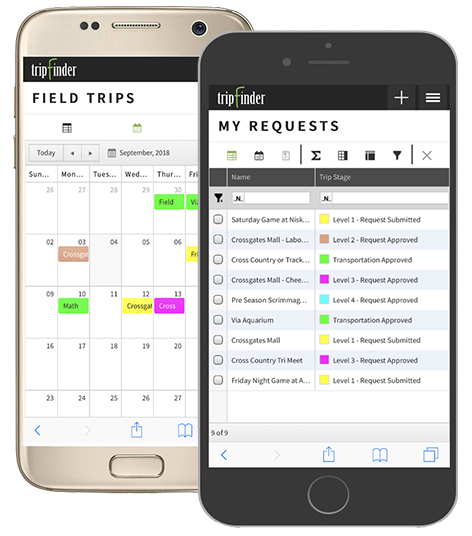
Manage Field Trip Requests and Approvals from Anywhere, Anytime – Now you can access Tripfinder from your favorite browser on your PC or mobile device.
End The Paper Chase
Transfinder will put an end to the paper chase and communication slip-ups that are inherent with a manual approach to field trip management.
- District personnel simply submit electronic field trip requests;
- Documentation can be uploaded, attached and viewed by requestors and approvers for each field trip request;
- Administrators can oversee the educational legitimacy of the requests and ensure that an appropriate budget is available to cover the costs;
- At a glance, you can see what is currently scheduled for a given day, week or month and avoid any scheduling conflicts;
- The calendar view allows you to edit, review and approve field trip requests.
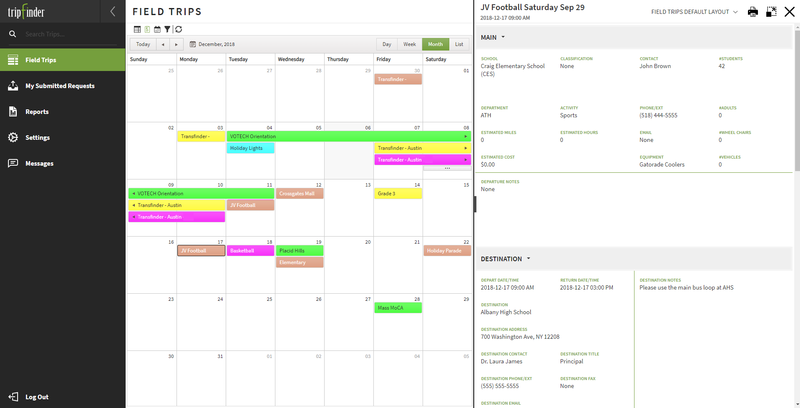
Calendar View with Details – Easily view all requests, pending requests and submitted requests from the Tripfinder grids.
Dynamic Reporting
Using Tripfinder, district administrators can easily generate invoices and run their transportation reports based on selected criteria. You also can add reports to the system to address the most common district requests.
The Field Trip Detail Report includes all of the information a driver needs, such as pick up and drop-off times and locations, directions, numbers of students and adults, phone numbers and notes.
When the mileage, time, and expense information is entered into Routefinder, the Cost Reports function breaks down and totals the various expenses incurred.
Built-in Billing Reports summarize costs by account code or by school, department or activity and provide you with the fiscal analysis tools you need.
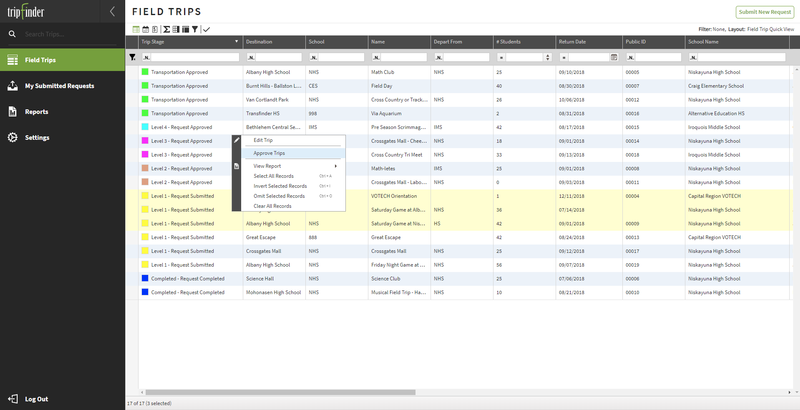
View Field Trip Requests – The entire approval process is automated. Color-coded lists and grids make finding and sorting field trips easy.
Scalable and Secure
With Tripfinder you can define requestor and approval levels and easily add more users as your needs change. You also can enable or disable features, show or hide specific data, and allow or disallow access to particular reports.
Tripfinder is authenticated with Active Directory so personnel have the ease and convenience of a single login and can easily switch to other Transfinder solutions without needing to sign in additional times.
1. What is Tripfinder and how does it streamline requests?
Tripfinder is Transfinder’s browser-based solution for managing field trip requests, approvals, and resource allocations from anywhere. District personnel can submit electronic field trip requests from any PC or mobile device, and the system automates approval stages, tracks request history, and sends email notifications.
2. How does Tripfinder automate the field trip approval process?
Tripfinder supports customizable approval levels and stages. Color-coded lists and grids make it easy to find and sort trips. As requests move toward final approval, Tripfinder tracks the history and sends automatic email notifications to the right people at each step.
3. Can Tripfinder help with field trip billing and cost tracking?
Yes. Tripfinder categorizes expenses to identify and avoid cost overruns. When mileage, time, and expense information is entered, the system breaks down and totals costs. Built-in billing reports summarize expenses by account code, school, department, or activity for accurate budgeting and invoicing.
4. What information does Tripfinder provide to bus drivers?
Tripfinder generates Field Trip Detail Reports that include pickup and drop-off times and locations, driving directions, student and adult counts, emergency phone numbers, and special notes. This ensures drivers have complete, accurate information for safe and efficient trips.
5. Does Tripfinder integrate with other Transfinder products?
Yes. Tripfinder integrates with Routefinder PLUS and Routefinder Pro for routing and with other Transfinder solutions. It supports Active Directory authentication for single sign-on, so users can move between Transfinder solutions without multiple logins.
6. How does Tripfinder improve communication during field trips?
Tripfinder keeps staff informed via automated email notifications at key points in the request and approval process. The calendar view lets you edit, review, and approve requests while viewing submitted, pending, and approved trips, improving transparency and coordination among coordinators, administrators, and drivers.