

GPS Connect
GPS Connect provides your district with an analytical tool beyond compare. Only Transfinder’s mapping technology can harness the power of real world latitude and longitude coordinates.

School bus GPS tracking with GPS Connect provides your district with an analytical tool beyond compare.
Harnessing GPS Power
GPS Connect (formerly Busfinder) is the GPS enhancement designed for the Routefinder Pro transportation management solution. It interfaces with your GPS system by displaying bus locations and path-points on Routefinder Pro maps - so that you can see that your buses where they are supposed to be.
Only Transfinder’s mapping technology can harness the power of real world latitude and longitude coordinates. While in the routing mode, GPS Connect displays real time or historical GPS data simultaneously with planned route data on the same map.
With GPS Connect, you can enable GPS data…
- Compare actual data with planned routes to make key managerial decisions;
- Maintain your map using GPS data points even before your county maps are updated;
- Easily analyze and adjust driving paths and stop times;
- Track and improve driver behavior;
- Reduce your district’s carbon footprint by monitoring idle times;
- Create trips from GPS events – Implement
and modify routes in less time, and
- Increase overall fuel efficiency and reduce costs.
A Natural Fit
GPS Connect can read GPS data from hardware units supplied by most, if not all, of the leading GPS vendors. By integrating GPS into your system, you can more easily and accurately map bus routes, track driver habits, verify schedules, map new housing developments, or accommodate road construction.
Monitor Your Operation More Closely
With your GPS information, you can add and edit streets, create or modify bus routes, and/or reposition stops. You also can see an alternative route taken by an experienced driver based on actual (and sometimes unplanned) driving conditions. This enables you to adjust driving paths and alert students and parents to adjustments.
With GPS Connect, you can establish a series of alerts to track variances in paths, speed, and time. If anything out of the ordinary happens, GPS Connect will keep you informed via electronic notification—wherever you are and whatever you are doing.
You can set parameters for notifications based on a variety of driving variances important to your particular district. For example, you can see how far away from a planned stop the bus actually stopped; see if it was early or late to the stop; or receive an alert if the travel speed exceeded 10 miles or more above the posted speed limit.
Critical grid information is automatically highlighted, in customizable hues, to bring attention to matters of urgency.
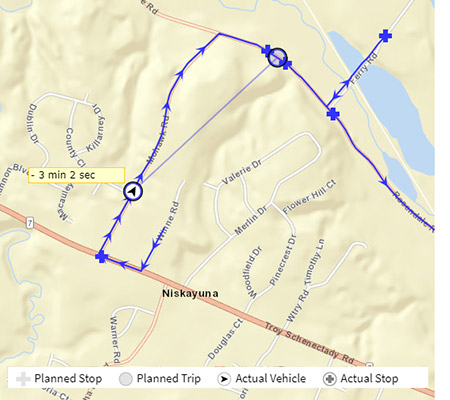
With our comparative analysis tool, key staff can watch the bus in motion live, or review historical data. Users can see where the bus SHOULD BE at 7:38am (open circle) as well as where the bus ACTUALLY IS at 7:38am (Circle with arrow).
School building staff could watch their buses in the morning, and know if a bus is running late, without even calling Transportation. If a situation arises, staff can look to see if a bus was where it should have been at a certain time of day.
Be Up and Running Quickly
If you are considering GPS, our Implementation and Training staff will help you benefit immediately from your investment in GPS Connect by helping you to get up and running in a timely manner.
1. What does Transfinder’s GPS tracking system monitor?
It monitors real-time bus locations, stop arrivals, departure times, route progress, idle time, speed, and exceptions such as off-route behavior.
2. How accurate is the GPS data?
GPS data is updated in near real time and can be enhanced by hardware integrations or device-based GPS from Wayfinder. The system is designed for operational visibility rather than law-enforcement precision.
3. Can the system alert staff when buses deviate from planned routes?
Yes. Administrators can receive alerts for off-route activity, unauthorized stops, significant delays, and violations of district-defined rules.
4. Does GPS tracking integrate with Routefinder PLUS?
Yes. Routefinder PLUS provides the baseline routing data, and GPS tracking overlays real-world bus movement on those planned routes.
5. Can GPS data help reduce fuel costs?
Yes. By identifying excessive idling, unnecessary miles, and inefficient patterns, districts can adjust routing and driver behavior to reduce fuel consumption.
6. Is historical trip data available for reporting?
Yes. Administrators can review past trips, stop times, variances, and patterns to support investigations, audits, and operational reviews.
7. Does GPS tracking work with Stopfinder?
Yes. District-approved real-time tracking can be shared with parents through Stopfinder, giving families visibility into bus arrival estimates.